Walking Pad Workouts: Log Steps While Working From Home
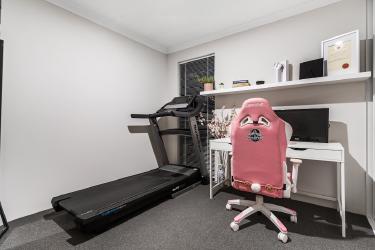
You sit all day. I know because I did too.
Remote work promised freedom - what it delivered? A chair that might as well be glued to my body. By 3 PM, my step count barely hit 800. That’s not a typo - eight hundred steps.
Then I bought a walking pad.
Six months later, I’m averaging 12,000 steps daily without leaving my home office. My energy crashed less - focus improved. And those afternoon headaches - gone.
Here’s how to make a walking pad work for your remote setup.
Choosing the Right Walking Pad for Desk Work
Not all walking pads suit home offices. The treadmill collecting dust in your garage won’t cut it-too loud, too bulky, requires too much attention.
Walk pads designed for under-desk use share specific traits:
1 - **Speed caps around 4 mph. ** You’re working, not training for a marathon. Anything faster makes typing impossible.
2 - **Noise levels under 50 decibels. ** That’s quieter than a normal conversation. Essential for video calls.
**Slim profiles (under 5 inches tall). ** Your desk height matters. Thicker machines force awkward arm angles.
**Belt width of at least 16 inches. ** Narrower belts cause you to focus on foot placement instead of your spreadsheet.
I tested three models before finding one that worked. The first was too loud-my mic picked up every footstep during meetings. The second had a belt so narrow I nearly stepped off twice. Third time, I focused on specifications rather than price.
Spend between $250-$400 for a decent under-desk model. Below that range, motors burn out within months. Above it, you’re paying for features you’ll never use while typing emails.
Setting Up Your Walking Workstation
Placement determines whether this becomes a habit or an expensive clothes hanger.
Step 1: Position your desk.
Standing desks work best, obviously. But here’s what nobody tells you-the desk height you use while stationary won’t work while walking. Movement changes your posture. Raise your desk 1-2 inches higher than your normal standing position.
No standing desk? A desk converter sits on your existing surface. Costs around $150 and solves the problem.
Step 2: Arrange your monitors.
Eye level shifts when you walk. Tilt your screen 5-10 degrees upward. Otherwise you’ll hunch forward, defeating the entire purpose of moving more.
Step 3: Check your cable management.
Power cords, charging cables, ethernet lines-they all become trip hazards when you’re in motion. Route everything to one side and secure with clips. I learned this after yanking my laptop off the desk. Once.
Step 4: Test your keyboard and mouse position.
Walking creates natural arm movement. Fixed keyboards force you to fight that rhythm. Consider a split keyboard or simply accept that you’ll type slightly slower while moving. I lose about 15% of my typing speed on the pad. Worth it.
Building Your Walking Schedule
Don’t walk eight hours straight. You’ll hate it by day three and quit by week two.
Start with what I call the 20-40-20 pattern:
- First 20 minutes of each hour: walk at 1.5-2 mph
- Middle 40 minutes: sit
- Final 20 minutes: walk again
This splits your walking into manageable chunks. Twelve hours of work becomes four hours of walking. That’s roughly 10,000 steps without dedicated exercise time.
After two weeks, your legs adapt. Then try the flip-40 minutes walking, 20 sitting. Some days I walk 80% of my workday. Other days, when deep focus matters, I sit most of the morning and walk through afternoon meetings.
Match activities to movement:
| Task | Walk? |
|---|---|
| Video calls (listening) | Yes |
| Video calls (presenting) | No |
| Email processing | Yes |
| Complex coding | No |
| Document review | Yes |
| Creative writing | Sometimes |
| Spreadsheet work | Slow walking only |
Your mileage varies - literally. Find what works through experimentation.
Tracking Steps That Actually Count
Built-in walking pad displays lie. They estimate based on belt movement, not actual steps. Your fitness tracker tells the truth.
Wear your watch or fitness band while walking. Compare its count to the machine’s display. My walking pad claims I take 20% more steps than my Garmin records. The machine counts belt rotations, not footfalls.
Set realistic targets:
- Week 1-2: Add 2,000 steps to your current baseline
- Week 3-4: Add another 2,000
- Month 2: Target 8,000-10,000 daily
- Month 3+: Maintain or increase to 12,000
Tracking apps help with accountability. I use a simple spreadsheet-date, step count, hours walked. Seeing the numbers climb motivates continued effort.
Common Problems and How to Fix Them
Your feet hurt after an hour.
You’re walking too fast or wearing the wrong shoes. Slow down to 1. 5 mph and switch to cushioned sneakers. Barefoot walking works for some people. Not for me-I needed arch support.
Video calls pick up footstep sounds.
Mute when not speaking - obvious, but people forget. Also check your mic settings-directional mics reject noise from below. Omnidirectional mics capture everything.
The walking pad shifts position throughout the day.
Furniture pads underneath prevent sliding. The rubber ones meant for couches work perfectly. Cut to size and place under all four corners.
You feel dizzy stepping off.
Normal for the first week - your inner ear adjusts. Stop walking a minute before you need to leave your desk. Let your body recalibrate.
Energy crashes hit harder than before.
You’re not eating enough. Walking burns 100-150 calories per hour at slow speeds. Add a mid-morning snack. Almonds, an apple, yogurt-something with protein and carbs.
Your productivity tanks during complex tasks.
Then sit for those tasks - this isn’t an all-or-nothing approach. Walk during easy work - sit during hard work. Simple.
Making the Habit Stick
Motivation fades - systems remain.
Place the walking pad in your office permanently. Rolled up in the closet means you’ll stop using it within a month. I kept mine parallel to my desk, always visible, always ready.
Link walking to existing habits. I walk during my first coffee. That trigger-coffee brewing-now automatically leads to stepping on the pad.
Tell people what you’re doing - accountability works. When colleagues asked about background noise on calls, I explained. Several bought their own walking pads after watching my step counts climb.
Celebrate small wins. My first 10,000-step day while working felt like completing a marathon. I texted three friends about it. That celebration reinforced the behavior.
And when you skip a day? Skip it - don’t spiral into guilt. Tomorrow the pad waits where you left it.
The Bottom Line
Remote work creates sedentary defaults - you sit for calls. Sit for focus time. Sit for lunch at your desk. That pattern kills you slowly-increased heart disease risk, weakened muscles, declining mental health.
A walking pad breaks the pattern without requiring dedicated workout time. You’re already at your desk - you’re already working. You’re just doing it while moving.
Start this week - position your desk. Order a pad - walk through your first meeting.
Your body will thank you by Friday.